Blockframe Company Deck
A ten-page company profile in white and deep blue: square photos on offset blocks, big serif titles and a few clear figures, all editable in the browser.
Agent Skills that turn findings into a designed, narrated deck for clients and executives, with speaker notes and an editable source file. For consultants and operators who present the same kind of story every week.
Checkout is not open yet: it opens once our payment provider finishes its review, and downloads open with it. Nothing is charged until then.
10 Skills · 9 free
A ten-page company profile in white and deep blue: square photos on offset blocks, big serif titles and a few clear figures, all editable in the browser.
A friendly ten-page company or studio profile in steel blue and white, with photos in curved frames, soft rounded cards and a few large figures.
A ten-page team introduction with black-and-white portraits, large capital headlines on pale grey and near-black pages, and violet arrow tiles.
A nine-page startup pitch with violet glass artwork, rounded picture windows and lilac pages: problem, product, pilot proof, pricing, roadmap and team.
A ten-page workshop or community-project deck with huge mint capital headlines, black marker drawings of people at work and warm paper pages.
A crisp ten-page company profile with slanted cobalt title ribbons, photos cut on angled edges and clean white pages of figures, steps, a chart and a table.
A ten-page marketing or launch plan on near-black pages with large serif headlines and cobalt crescent art: goals, audience, phases, budget and targets.
A nine-page brand strategy on deep ink pages with cream headlines, dark tiles lit one at a time and clay 3D still lifes: promise, audience, voice and roadmap.
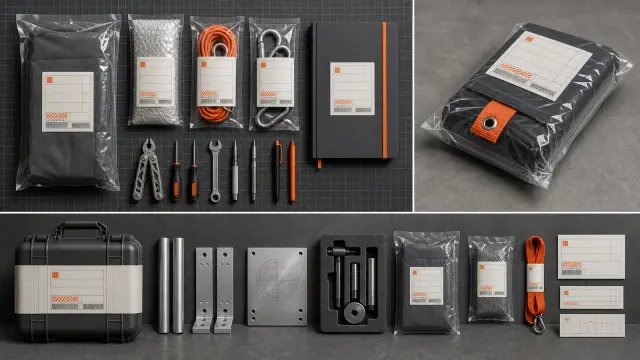
Recasts a fictional work profile as a tactile industrial archive kit with dummy labels and codes. It returns three 16:9 visual directions with clear evidence, rights, and review limits.
$4.99 or with Premium

Share cards with a dark side column and a white analytics board floating on a violet or teal-to-coral gradient, made by GPT Image 2 through FAL.
The same kind of work comes back again and again. A Skill settles the format once, so each new round only needs your material.
Every role page gathers the Skills that people in that job reach for most.
Three steps in Claude Code, Codex, Cursor or similar, with no design tools involved.
The folder to unzip into, from each agent’s own docs.
~/.claude/skills/~/.agents/skills/~/.cursor/skills/~/.agents/skills/~/.config/opencode/skills/~/.copilot/skills/~/.gemini/config/skills/~/.openclaw/skills/~/.kimi-code/skills/~/.trae/skills/A prompt alone gets you a first draft. A Skill gets you the same finished format on every run.
| Aspect | A plain prompt | A Skill |
|---|---|---|
| Format | Changes from run to run | Fixed and tested |
| Content | Often padded with made-up examples | Written from your own material |
| Next round | Start over and hope it matches | Swap in new material and run it again |
A few habits that make the first run count.
Any agent that reads SKILL.md folders, including Claude Code, Codex and Cursor. Only the folder you unzip into changes; each agent page shows it.
Yes. That is what it is for. Run it again with new material and you get the same format with the new content.
The Skills are written to work from what you provide and to flag gaps. Still read the result before you send it out.
No. Free Skills are complete. Premium Skills come one at a time or with a plan.
Pick a Skill, unzip one folder and ask for the result in plain words. $9.99 / month · $79 / year · $169 once, or $4.99 for one Skill.
See pricing