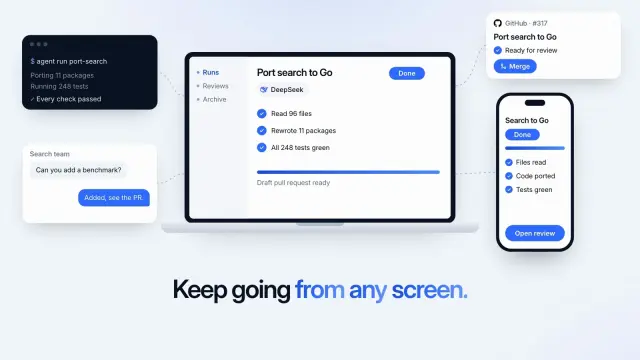
Every Screen Agent
A 6.8-second light product shot: an agent finishes a job on a laptop, the same job shows on a phone, and links reach a terminal, a chat and a code review.
Antigravity keeps personal Skills in ~/.gemini/config/skills/, one folder the App and the CLI share. 104 ready-made Skills for video, images, web pages and slides.
Checkout is not open yet: it opens once our payment provider finishes its review, and downloads open with it. Nothing is charged until then.
~/.gemini/config/skills/
└── ours-every-screen-agent/
    ├── SKILL.md
└── …From Antigravity docs: Agent skills (opens in a new tab) and Antigravity docs: Customization discovery (opens in a new tab), read 2026-11-05.
Each one is a plain SKILL.md folder, the format Google Antigravity reads. Skills that make images or video call FAL with your own key, so your agent needs to be allowed to run terminal commands.
A 6.8-second light product shot: an agent finishes a job on a laptop, the same job shows on a phone, and links reach a terminal, a chat and a code review.
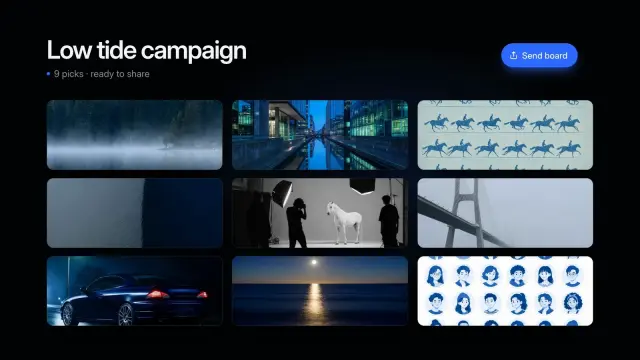
An 8.6-second dark montage: three quick spreads of photos with a headline each, then all nine snap into one tidy board with a send button.

Airy white share cards where thin curved lines sweep in toward a cobalt logo and wordmark in the middle. GPT Image 2 via FAL.
$4.99 or with Premium
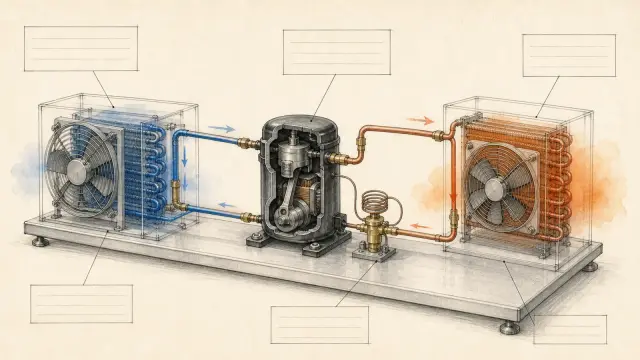
Makes a slide-ready concept diagram with pale see-through color washes, fine linework, and empty callout zones. Technical teachers can show a complex mechanism plainly, with no made-up facts.
$4.99 or with Premium
A one-file pharmacy store with 30 routes: filterable shop, a page per product, a working bag, demo checkout and pharmacist services.
A dark one-file marketing site for a software or AI product, 5 routes: a working app preview, a pricing toggle, help search, live events and a changelog.
A ten-page team introduction with black-and-white portraits, large capital headlines on pale grey and near-black pages, and violet arrow tiles.
A nine-page startup pitch with violet glass artwork, rounded picture windows and lilac pages: problem, product, pilot proof, pricing, roadmap and team.
Get the Skill’s ZIP from its card once downloads open, then:
Antigravity loads every rule it finds; rules don’t replace each other. A Skill puts only its name and description in front of the agent on each turn, and the agent reads the full SKILL.md when your task matches.
Global Skills go in ~/.gemini/config/skills/<skill>/, shared by the Antigravity App and CLI. Workspace Skills go in .agents/skills/<skill>/ in your project; commit that folder to share it with your team. Source (opens in a new tab)
No. Antigravity rereads rules and Skills before each turn, so a new Skill applies to your next message. In the CLI, run /skills reload or start a new conversation to update the /skills list and the slash commands. Source (opens in a new tab)
Check that the folder is in the workspace, a parent folder up to the repository root, or ~/.gemini/config/skills/, and that SKILL.md sits in a folder directly inside skills/: Antigravity scans one level deep. Source (opens in a new tab)
Yes. It defaults to .agents/skills but still reads .agent/skills for backward compatibility. The IDE also still supports the legacy ~/.gemini/antigravity/skills/. Source (opens in a new tab)
~/.claude/skills/~/.agents/skills/~/.cursor/skills/~/.agents/skills/~/.config/opencode/skills/~/.copilot/skills/~/.openclaw/skills/~/.kimi-code/skills/~/.trae/skills/$9.99 / month · $79 / year · $169 once, or $4.99 for one Skill.
See pricing