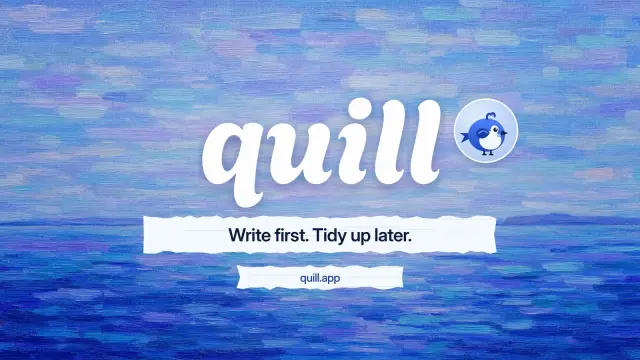
Paint Sweep Finale
An 8.6-second end card: a paint stroke wipes the last shot away, your name is painted on over a blue sky, and your tagline and link arrive on paper strips.
OpenClaw reads Skills from the agent’s workspace first, then ~/.agents/skills/ and the shared ~/.openclaw/skills/. 104 ready-made Skills for video, images, web pages and slides.
Checkout is not open yet: it opens once our payment provider finishes its review, and downloads open with it. Nothing is charged until then.
~/.openclaw/skills/
└── ours-paint-sweep-finale/
    ├── SKILL.md
└── …From OpenClaw docs: Skills (opens in a new tab), read 2026-11-05.
Each one is a plain SKILL.md folder, the format OpenClaw reads. Skills that make images or video call FAL with your own key, so your agent needs to be allowed to run terminal commands.
An 8.6-second end card: a paint stroke wipes the last shot away, your name is painted on over a blue sky, and your tagline and link arrive on paper strips.
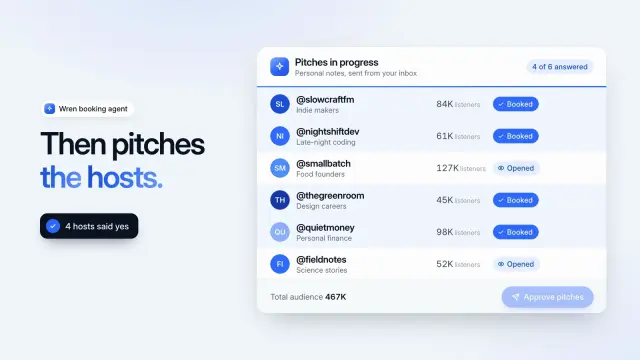
A 9.4-second light product demo: an agent shortlists six podcasts, you approve, and each pitch moves from sent to opened to booked.
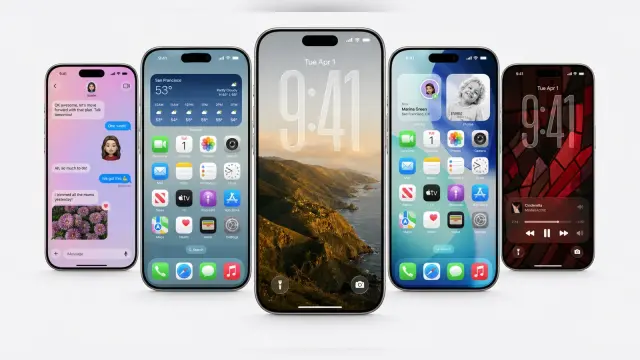
Clean share cards with a fan of realistic phones on pale grey, one big front screen and bright app screens behind it. GPT Image 2 via FAL.
$4.99 or with Premium

Renders a polished exploded-view poster of an appliance from an approved parts and materials list. Product teams get a clear technical hero image, with branding, specs and claims kept checkable.
$4.99 or with Premium
A one-file site for a juice, drinks or food brand, with 31 routes: a gradient campaign hero with drifting cream ribbons, an arched flavor rail, a crate builder, bag, demo checkout and stockist map.
$4.99 or with Premium
A one-file home for an interview show, 31 routes: a dark hero card with an audio card, a docked player with chapters and a queue, a filtered archive, episode pages with transcripts, and guests.
$4.99 or with Premium
A ten-page workshop or community-project deck with huge mint capital headlines, black marker drawings of people at work and warm paper pages.
A crisp ten-page company profile with slanted cobalt title ribbons, photos cut on angled edges and clean white pages of figures, steps, a chart and a table.
Get the Skill’s ZIP from its card once downloads open, then:
Skills you install are folders you put in a Skills directory. Workshop Skills are ones an agent saves and updates on its own; they stay with that agent, and every change keeps the previous version so it can be undone.
Highest first: the workspace’s skills/, its .agents/skills/, ~/.agents/skills/, the shared ~/.openclaw/skills/, Workshop Skills, bundled Skills, then extra folders and plugin Skills. When two share a name, the higher one wins. Source (opens in a new tab)
No. With skills.load.watch on (the default), adding a Skill triggers a rescan, and existing sessions pick up changed file-backed Skills on their next turn. A safety rescan also runs every 30 minutes. Source (opens in a new tab)
Run openclaw skills check. A Skill can be found but not ready, because a required binary, environment variable or config is missing, or hidden by the agent’s allowlist. Source (opens in a new tab)
Type $ in the Control UI composer and pick it, or write $skill-name in your message; one message can reference up to eight Skills. On channel messages, /skill-name works as a standalone command. Source (opens in a new tab)
~/.claude/skills/~/.agents/skills/~/.cursor/skills/~/.agents/skills/~/.config/opencode/skills/~/.copilot/skills/~/.gemini/config/skills/~/.kimi-code/skills/~/.trae/skills/$9.99 / month · $79 / year · $169 once, or $4.99 for one Skill.
See pricing