Spreadsheet Tablev1.0.3
Use this Skill to make an infographic.
- Yours to keep: the files stay on your computer.
- Payment by Waffo Pancake, our merchant of record.
- 38 free Skills to try first
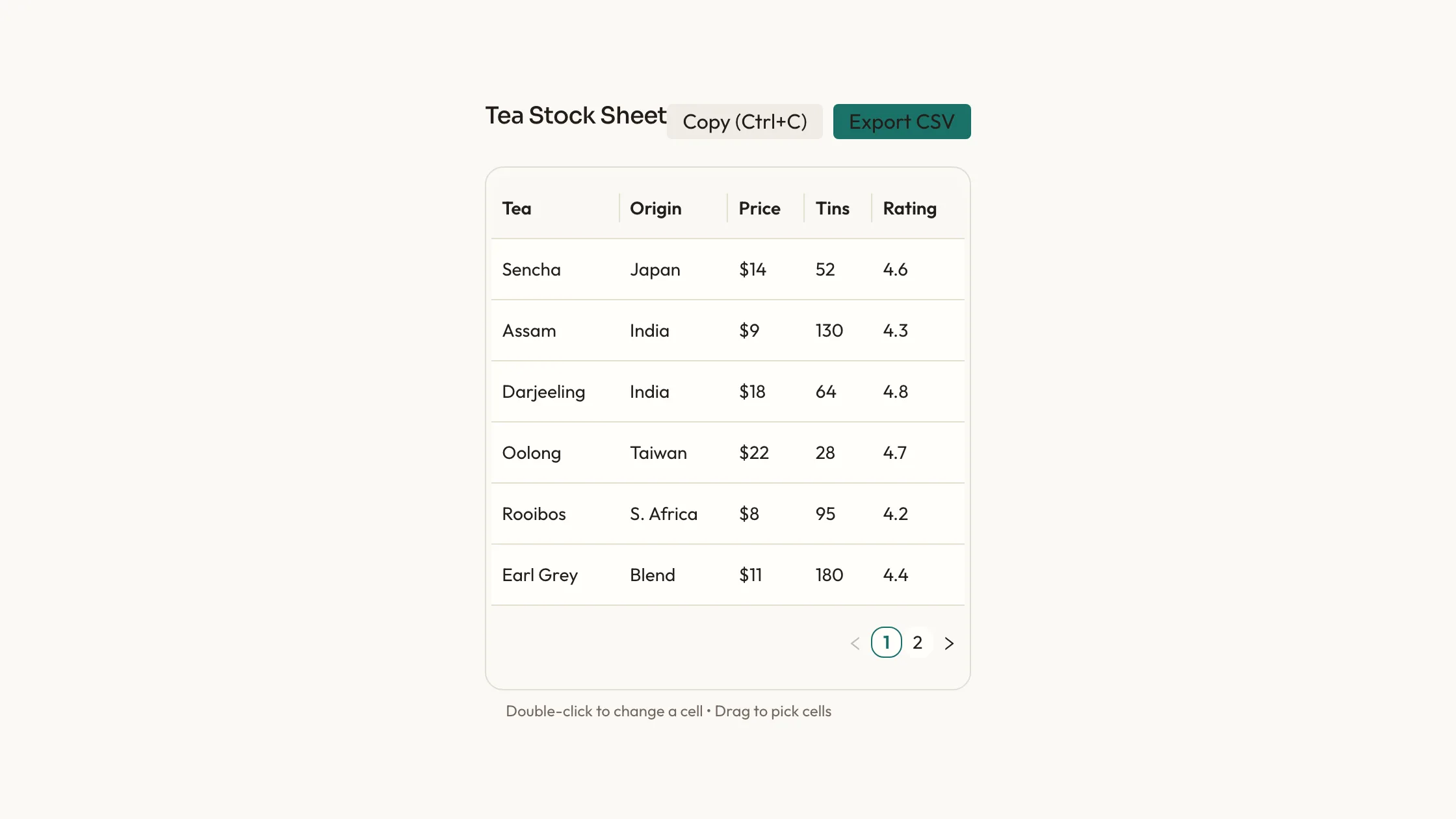
A spreadsheet table skill for Claude Fable 5: a small paged sheet with copy, CSV export, double-click editing and drag-to-pick cells, as React source on Ant Design.
Picked most often by
Updated Nov 9, 2026
Preview gallery


Similar Skills
View all



What you get
- Spreadsheet Table as editable source: the sheet component, a plainer sortable table and a usage example of a tea shop's stock.
- Theme tokens for palette, type, radius, icon stroke and motion in references/theme.md, ready to edit in one place.
- Headers and rows passed as plain string arrays, so your own records drop straight in.
Good fit
- Dashboards where readers need to copy rows into a spreadsheet or take a CSV away.
- Small inventories, price lists or rosters that fit comfortably across a few pages.
- Projects that want a real Ant Design table in the page's own colors and type.
Not for
- Products that already follow a design system of their own; this block's palette and type scale would compete with it.
- Anyone wanting a versioned package from npm; you receive source code and keep it up to date yourself.
- Large live data sets that need streaming updates or virtual scrolling.
About this Skill
Spreadsheet Table is a data table skill for Claude Fable 5, for the moment a page needs a sheet people can actually work with. A title sits over an Ant Design table, six rows to a page, with a Copy button and an Export CSV button beside it. Copy takes every row as tab-separated text, or only the cells someone dragged across; Ctrl or Cmd+C does the same. Double-click a cell to change it. The usage example is a tea shop's stock sheet held in state, so edits stay on screen. A second, plainer table file is included for when you want click-to-sort columns.
How it works
- Point the agent at the page; it reads package.json and your framework config, then writes the sheet in the project's idiom.
- Set the title and the CSV file name, and choose how many rows fit on a page.
- Pass your own headers and rows; paging, copying and export keep working on them.
- Run scripts/check-blocks.mjs, then try the sheet at phone width, where it scrolls sideways.
Checked before delivery
- The rows are drawn by Ant Design's Table inside the framed box, six to a page, with the pager in the corner
- Copy puts every row on the clipboard as tab-separated text, and the export saves the same rows as a CSV file with a heading row
- scripts/check-blocks.mjs reports no symbol icons, no off-palette blue or violet and no remote files
What you need before you start
- You bring
- The sheet's title and its columns, each with a heading · The rows to show, one value per column, such as a stock list of a few dozen items
- Dependencies
- Ant Design 5 or newer, installed with your project's package manager
- Outside costs
- None
- Last tested
- v1.0.3 — Claude Code / Cursor
User reviews
Loading reviews…
FAQ
What does the Copy button copy?
Every row with its headings as tab-separated text, ready to paste into a spreadsheet. If someone dragged across cells first, only those cells are copied, and Ctrl or Cmd+C does the same thing.
Does the sheet call any outside service?
No. Copying uses the browser clipboard, the CSV is built in the page, and scripts/check-blocks.mjs flags any file loaded from another host.
Can I restyle the sheet?
Yes. Colors, radius and type are tokens, and the sheet hands them to Ant Design through one theme block.