An interactive hypercar configurator in three.js
@shmidtqq0:21
From the post
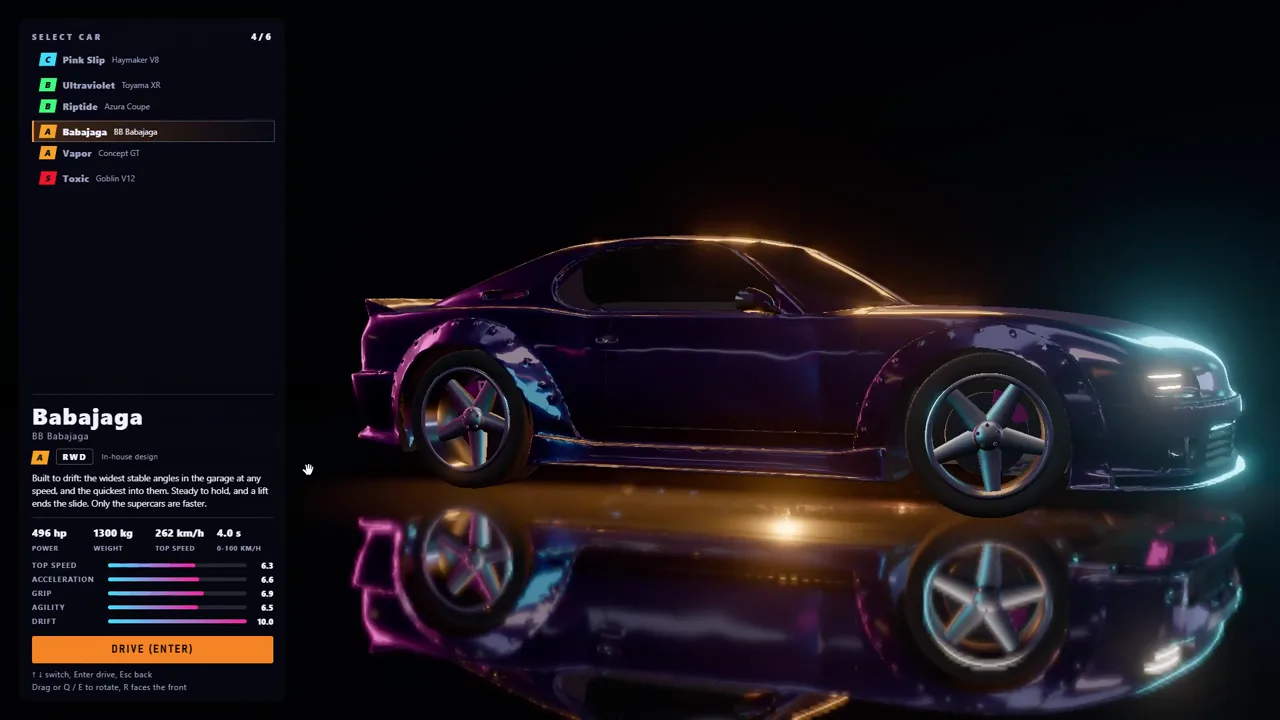
Fable 5.5 just destroyed all 3D agencies... this is f*cking insane. i one-shoted this interactive hypercar configurator with Fable 5.5, and it looks better than 90% of car brand sites. > pure three.js, zero 3D software > all geometry and materials generated by code > single HTML file, works offline, clickable camera presets and paint swap the prompt i fed the model, in the first reply then, a breakdown on how to ship stuff like this in one shot
Prompt the author shared
Build a single self-contained index.html: an interactive studio configurator for a fictional hypercar, the AURIGA A-27, in vanilla three.js r160 loaded through an importmap from jsDelivr (three + three/addons). No GLTF, no image files, no HDRI downloads: every mesh, texture and decal is generated in code. The only other allowed network requests are the Google Fonts Michroma and Barlow Condensed. Target 1920x1080 at 60 fps on a mid-range laptop. Output the complete file: no explanations, no placeholders, no "rest of the code goes here".

1. LOOK AND FEEL
- Mood: a night-time car brand hero render. Pure black void (#000), the car floating in a pool of light, long clean highlights sliding across deep clearcoat paint.
- Floor: Reflector from three/addons with a dark tint, covered by a semi-transparent black plane so the reflection reads dim and soft and fades out within ~4 m. Radial falloff to pure black at the edges. Soft contact shadow under the car (blurred radial gradient CanvasTexture) plus a darker patch under each tire.
- Reflections: build a custom studio environment and bake it with PMREMGenerator.fromScene: a black sphere with 4 emissive rectangular softboxes (one long strip overhead along the car axis, two tall strips on the sides, one small warm panel behind). scene.environment = that texture, scene.background stays black. This is what puts the long white streaks on the paint, do not skip it.
- Direct lights: soft key from above-front, cool rim from the right, warm rim from the left, very weak bounce from below. PCFSoftShadowMap, shadows from the key only.
- Post: EffectComposer -> RenderPass -> BokehPass (depth of field only in close-ups, focus follows the camera target) -> UnrealBloomPass (threshold 0.85, strength 0.35, radius 0.6) -> custom ShaderPass (subtle vignette, very fine film grain, 0.0015 chromatic aberration toward the edges) -> OutputPass -> FXAA. ACESFilmic tone mapping, exposure 1.05, sRGB output.
- Camera: PerspectiveCamera fov 30, near 0.1, far 100. OrbitControls with damping 0.06, distance 2.2 to 14, polar angle clamped so the camera never dips under the floor, panning off.

2. THE CAR (real scale in meters: length 4.9, width 2.05, height 1.08, wheelbase 2.85, wheel diameter 0.71)
- Silhouette: a late-90s GT1 Le Mans prototype (think Toyota GT-One or Mercedes CLK-LM) crossed with a modern hypercar. Long low nose, front fenders rising above the hood as two swollen arches with the hood dipping between them, a low bubble canopy in the middle, long engine cover, closed rear arches, tall vertical tail, huge rear wing.
- Build the main body as a LOFT, not boxes: 25-40 cross-sections along the length (one CatmullRomCurve3 per section, width/height/shoulder driven by smooth functions of x), sampled into a custom BufferGeometry with proper UVs (u along the length, v around the section), then computeVertexNormals. Front fenders, rear haunches, side pods, canopy and nose are separate lofted or lathed pieces that overlap the body cleanly. No CSG.
- Thin dark panel gaps (door shut lines, engine cover seam) baked into the normal and roughness maps.
- Wheel arches with dark liners so the tires sit in shadow. Front splitter and rear diffuser in satin black carbon (fine procedural twill DataTexture as normal and roughness detail).
- Cockpit: dark tinted glass canopy (MeshPhysicalMaterial, no transmission, black tint, strong clearcoat), a dark sun strip across the top of the windscreen with the AURIGA wordmark. Small mirrors on stalks on top of the front fenders.
- Front: one round headlight in each fender tip, a glass lens with an LED halo ring and a bright inner projector, plus a thin LED running-light streak along the outer edge of the fender; a dark perforated mesh intake across the lower nose (alphaMap pattern); an orange tow-hook ring on one side of the splitter.
- Side: four slanted black vents right behind the front wheel; a large dark trapezoid intake ahead of the rear wheel; a thin orange pinstripe along the shoulder line from the front fender to the tail.
- Rear: vertical dark perforated rear panel framed by one continuous red LED strip (a glowing frame that blooms), AURIGA lettering across the top of the panel, twin round exhausts in brushed bronze titanium, a small red rain light at the bottom center, diffuser fins underneath.
- Rear wing: wide main plane on two swan-neck pylons, flat endplates printed "A-27", plus a shark fin running from the canopy back to the wing, printed "27".

3. PAINT, STRIPES AND LIVERY
- Paint: MeshPhysicalMaterial, metalness 0.65, roughness 0.32, clearcoat 1.0, clearcoatRoughness 0.03, envMapIntensity 1.3, plus a fine metallic-flake normal map generated from noise in a DataTexture.
- The livery is painted into the body's UV space as CanvasTexture masks and mixed in via onBeforeCompile, so the base color is a uniform and the livery stays on top when the color changes:
  - two parallel white racing stripes from the nose over the hood, the canopy and down the engine cover to the tail
  - a big "27" on both doors, white with a thin orange-red outline and a slight emissive glow
  - "AURIGA" in wide letterspaced caps under the number
  - under that, a spec line in small condensed caps: "A-27  /  1 640 HP  /  0-100 KM/H 2.0 S  /  V8 HYBRID"
  - a smaller "27" on the engine cover near the wing
  - on each rear haunch, the Auriga constellation: 6 small glowing stars joined by hairlines, the brightest one labeled "CAPELLA · α AUR"
- Color swap: smooth 0.4-0.6 s crossfade of the base color in linear space, livery untouched (on the white paint the stripes turn dark red).

4. WHEELS (the hero close-up of the film, go all in)
- Ten twisted diamond-cut spokes in gunmetal silver with hard facets (flat shading on the spokes only), dark rim barrel, glossy lip.
- Drilled dark brake disc (hole pattern in a texture), big orange caliper printed "AURIGA".
- Orange hexagonal center-lock nut with a black center cap.
- Slick tires, matte black rubber with subtle noise, gray-white sidewall lettering: "AURIGA CORSA" and "330/710 R20 · SLICK", each twice around the sidewall.

5. UI (HTML overlay, pointer events only on the controls)
- Top left: "AURIGA" in Michroma, 28px, letter-spacing 0.35em, white. Below: "A-27 HYPERCAR · DRAG TO ORBIT · SCROLL TO ZOOM" in Barlow Condensed 600, 11px, letter-spacing 0.25em, #9a9a9a.
- Bottom left: six glossy sphere swatches, 22px (radial gradients), the active one with a thin white ring, its name to the right in Barlow Condensed 11px, letter-spacing 0.3em, gray:
  ROSSO VULCANO - paint #6b0d14, swatch #972d33
  BLU NOTTE - paint #14205a, swatch #3b4d86
  ARGENTO LIQUIDO - paint #b8b9bd, metalness 0.9, roughness 0.18, swatch #c1c1c4
  NERO ASSOLUTO - paint #050505, swatch #303032
  ARANCIO CAPELLA - paint #c8410f, swatch #d26d47
  BIANCO STELLA - paint #e9e8e4, swatch #d8d8d8
- Bottom right: two button groups 24px apart: [HERO] [FRONT] [SIDE] [REAR] [TOP] [WHEEL]   [SPIN] [LIGHTS] [TOUR]. Buttons 28px high, Barlow Condensed 600, 11px, letter-spacing 0.2em, 1px border rgba(255,255,255,0.12), near-black fill; an active or toggled-on button is filled #ececec with black text.
- Camera presets fly over 1.4 s with easeInOutCubic on position, target, fov and focus distance. SPIN = turntable rotation of the car at 0.15 rad/s. LIGHTS = headlights, rear LED frame and number glow on/off. TOUR = play/stop the sequence below. Any drag or scroll cancels the tour.

6. TOUR (autoplays on load, 21 s, built for screen recording; one continuous loop around the car: right front -> along the right side -> behind the tail -> along the left side -> left front; camera position and target each follow a CatmullRomCurve3, and the matching preset button lights up for each segment)
- 0.0-2.0 s: black screen, the car slowly emerges from darkness (lights and exposure ramp up from 0), wide front 3/4 with the nose pointing to the right of frame, HERO lit.
- 2.0 s: headlights flick on with two short flickers and a bloom pop, LIGHTS turns on.
- 2.0-4.5 s: slow dolly into the front 3/4, ending on a close-up of the headlight and the hood stripes (FRONT).
- 4.5-6.5 s: drop to the front wheel: spokes, caliper, tire lettering, side vents, shallow depth of field (WHEEL).
- 6.5-9.0 s: low glide along the side across "27", AURIGA and the spec line (SIDE).
- 9.0-10.5 s: continue to the rear wheel and the constellation on the haunch.
- 10.5-12.0 s: wrap around the tail: close on the glowing LED frame, the exhausts and the rear AURIGA lettering (REAR), crossing behind the car to its other side.
- 12.0-14.0 s: pull back to a wide rear 3/4 view.
- 14.0-18.0 s: one wide orbit from rear 3/4 through the side profile to front 3/4 while the paint cycles BLU NOTTE -> ARGENTO LIQUIDO -> NERO ASSOLUTO -> ARANCIO CAPELLA, about one second each, swatches updating live.
- 18.0-21.0 s: back to ROSSO VULCANO, settle on the HERO front 3/4 with the nose pointing to the left of frame, headlights on, very slow push-in, hold the last frame.

7. CODE
- Header-comment sections: SETUP, ENVIRONMENT, LIGHTS, MATERIALS, TEXTURES, BODY, DETAILS, WHEELS, LIVERY, UI, PRESETS, TOUR, POSTFX, LOOP.
- pixelRatio = min(devicePixelRatio, 2), correct resize, zero console errors.
- Whenever the choice is between "technically correct" and "looks more expensive on camera", pick the second.
Author’s claim. Posted before Fable 5.2 came out. The author called it Fable 5.5, the name rumors gave the next Fable. We can’t verify which model ran.
Popular on The Frontier Brief
Popular video Skills